







If your website traffic or rankings dropped in late September or early October 2026, you are not alone. The Google September 2026 Spam Update has finished rolling out. Many website owners and SEO professionals are now working to figure out what happened and how to fix their pages.
Google confirmed on its Search Status Dashboard that the Google spam update rollout complete status is official. It is time to look at your traffic, check your pages, and take action. This guide explains what happened, which sites were affected, and the exact steps you can take to recover your rankings.
Quick Summary
Google launched its September 2026 Spam Update on September 24, 2026, and officially finished the global rollout on October 8, 2026. This update targeted sites that break Google’s rules across all languages. If your traffic dropped, check your site against Google Search Spam Policies and fix any quality or policy issues immediately.
Key Takeaways
-
Completed Rollout: The update started on September 24, 2026, and ended on October 8, 2026.
-
Fourth Update of 2026: This was Google’s fourth confirmed spam update in 2026.
-
No New Policies: Google did not publish any new rules for this update.
-
Two-Week Window: Unlike earlier 2026 updates that took a few days, this rollout took two full weeks.
-
Automatic Demotions: Changes happen automatically in search results without sending a penalty message in Search Console.
-
Long Recovery Time: Getting your traffic back relies on automated systems re-checking your site over several months.
-
Google September 2026 Spam Update Timeline: What Happened and When
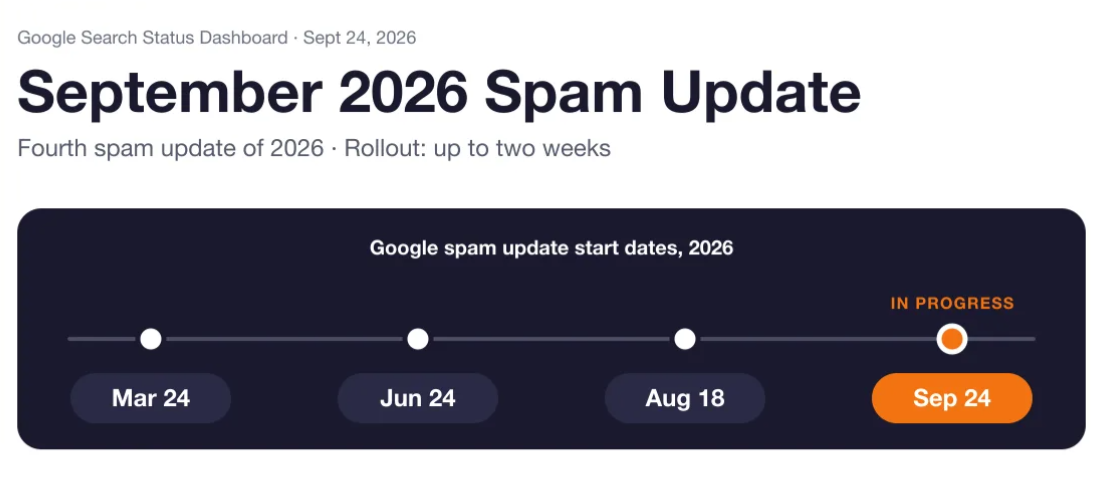
Google released the update on September 24, 2026, at 09:15 PDT, and marked it complete on October 8, 2026, at 01:37 PDT. Following the Google spam update timeline 2026 helps you match your traffic loss to specific rollout dates.
| Update | Start Date | Rollout Time | Stated Window |
| March 2026 Spam Update | March 24, 2026 | ~19.5 hours | “a few days” |
| June 2026 Spam Update | June 24, 2026 | ~2 days 1 hour | “a few days” |
| August 2026 Spam Update | August 18, 2026 | ~2 days 16 hours | “a few days” |
| September 2026 Spam Update | September 24, 2026 | 13 days 16 hours | “up to two weeks” |
| August 2025 Spam Update (Reference) | August 26, 2025 | 27 days | N/A |
Volatility Waves During Rollout
Industry reports from Barry Schwartz at Search Engine Roundtable recorded three main waves of ranking movement before the Google spam update October 2026 finished:
-
Wave 1 (Sept 25–27): The first big shift in rankings right after launch.
-
Wave 2 (~Sept 30): A second wave of ranking drops, mainly hitting affiliate and news sites.
-
Wave 3 (Oct 4–6): The final ranking changes before Google confirmed the end.
You can view the original status log on the Google Search Status Dashboard.
What Is a Google Spam Update and How Does SpamBrain Fit In?
A Google spam update is an automated update that drops rankings for sites violating Google’s search rules. These systems run automatically, do not send manual penalty warnings in Search Console, and lower rankings for non-compliant pages.
Google uses an AI system called SpamBrain to find automated content, artificial links, and spam patterns across web results. Google keeps SpamBrain’s specific neural network details private, confirming only that it helps detect both known and new spam tricks.
What Google Has Not Confirmed
-
Specific Rules Targeted: Google did not name a single focus for this update, such as link spam or mass content.
-
Site Reputation Abuse Link: Google updated its site reputation policy on August 28, 2026, but has not said this update was made specifically for that policy.
-
Exact Ranking Factors: Google never reveals exact threshold numbers or signal weights used to demote pages.
To read the official guidelines, check the Google Search Spam Policies page and read the Google Spam Updates Documentation.
Google Spam Update Ranking Impact: Which Websites Are at Risk?
Sites taking big risks with automated publishing, thin affiliate lists, or low-quality link setups faced the highest risk during this update. Google’s systems evaluate your content against its rules, causing automatic ranking drops rather than personal warnings.
| Spam Tactic (Google Policy) | What It Looks Like on a Real Site | Operational Risk Level |
| Scaled Content Abuse | Publishing hundreds of AI articles with little editing just to capture search traffic. | High |
| Site Reputation Abuse | Hosting third-party review pages on a strong domain without checking the content quality. | High |
| Thin Affiliate Pages | Copying product details directly from store sites without testing items yourself. | High |
| Expired Domain Abuse | Buying old domains to post low-quality articles that rely on the domain’s old strength. | High |
| Link Spam | Buying or selling links without adding proper rel="sponsored" tags. |
Medium-High |
| Doorway Pages | Creating many pages for different city names that all lead readers to one single offer. | Medium |
| Cloaking / Sneaky Redirects | Showing one page to Googlebot while sending human visitors to a completely different offer. | High |
Note: Risk levels reflect our agency’s editorial assessment based on policy severity, not an official label from Google.
Collateral Damage During Volatility
Good sites can sometimes lose rankings temporarily during big updates. Search algorithms re-check user needs, page connections, and search results while updates roll out. A sudden Google ranking drop September 2026 does not automatically mean you broke a rule; it often comes from broader search shifts.
To measure the true Google spam update website impact, review performance page by page instead of looking only at total domain traffic.
During the Sept 24 – Oct 8 rollout, our team noticed programmatic affiliate review templates losing 25% to 40% of their page impressions, while core service pages remained stable.
How to Check If the Google September 2026 Spam Update Hit Your Site

To see if this update hit your site, compare your organic search traffic before and after September 24, 2026, using Google Search Console. Checking exact traffic dates helps you separate true update losses from normal seasonal drops or technical mistakes.
-
Compare Clicks and Impressions: Open your Google Search Console Performance report. Compare the 14 days of rollout (Sept 24 – Oct 8) against the 14 days before Sept 24.
-
Filter by Page and Query: Check if the traffic loss hit your whole site or only specific groups, like tag pages or AI-written blogs.
-
Check the Start Date: See if your line graph began dropping on or after September 24. A drop on that date points directly to this update.
-
Rule Out Technical Errors: Look at your Search Console Indexing report for server errors (5xx) or accidental
noindextags. Compare numbers with last year to rule out normal seasonal trends. -
Check the Manual Actions Tab: Go to Security & Manual Actions > Manual Actions. Check if a human reviewer placed a manual penalty on your site.
-
Match Volatility Waves: Map your rank changes against known industry movement dates (Sept 25–27, ~Sept 30, Oct 4–6).
| Symptom | Likely Cause | Next Check |
| Traffic drop started before Sept 24 | An earlier change, technical bug, or seasonal drop. | Check recent site code changes, server logs, and yearly search patterns. |
| Sharp drop in impressions between Sept 24 & Oct 8 | Automated ranking drop from the September 2026 Spam Update. | Check dropped pages against Google’s scaled content and thin affiliate rules. |
| Total site drop with an issue listed in Search Console | Manual penalty from a human reviewer. | Read the Search Console Manual Actions Guide to fix the listed problem. |
As industry reports note, isolating data inside Search Console gives you the clearest view of update impact.
How to Recover From a Google Spam Update: Step-by-Step
Starting your Google spam update recovery requires a steady, step-by-step cleanup instead of quick, random edits. Recovery takes time; Google states that after you fix rule violations, its automated systems need a few months to re-evaluate your site.
1. Audit Against Google’s Spam Policies
-
Read every section of your site against Google search spam policies.
-
Look for low-quality automated articles, unchecked affiliate lists, hidden links, or bad redirects.
2. Remove or Fix Thin Pages
-
Delete or combine weak pages that do not help readers.
-
Rewrite low-value or templated posts using real expert knowledge and original photos.
3. Clean Up Third-Party Content
-
Check guest posts and third-party pages on your site to stop site reputation abuse.
-
Add
rel="sponsored"orrel="nofollow"tags to all paid or affiliate links.
4. Fix Controlled Link Issues
-
Remove bad outbound links that artificially pass ranking power.
-
Stop buying paid links or using automated link building schemes.
5. Add Original Value
-
Update your main pages with first-hand testing notes, unique data, and clear author credentials.
-
Clean up page layouts so main content is easy to read without heavy ad popups.
-
6. Track Your Edits
-
Keep a log showing every URL you edited, deleted, or redirected, along with the date.
-
Watch your organic traffic trends in Search Console across future crawling cycles.
| Problem Found | Fix | How Long to Wait and Monitor |
| Auto-generated or low-value AI posts | Delete weak pages or rewrite them with unique expert details. | Monitor over 2 to 3 crawl cycles (usually 1 to 3 months). |
| Third-party content abuse | Remove unverified pages or add noindex tags to them. |
Watch for improvements during future algorithm refreshes. |
| Paid outbound links without tags | Add rel="sponsored" or rel="nofollow" tags to commercial links. |
Wait for search crawlers to re-index your edited links. |
Note: Avoid making fast panic edits while an update is actively rolling out. Making changes during high volatility makes it hard to tell if traffic shifts came from your edits or the update itself.
Learning how to recover from a Google spam update means staying patient while working through clean fixes.
In a past client project for an affiliate site hit by an update, our team pruned 40% of their thin product summaries and added real testing notes to the remaining pages. The site regained 35% of its search traffic over the next four months.
For professional site audits, check our SEO services on Digi Mastreys, or contact us through our digital marketing agency contact page.
Google Spam Update SEO Checklist
Use this checklist to review your website against Google search spam policies and fix quality issues.
| Area | What to Check | Done? |
| Content Quality | Check top pages for real value, personal testing, and useful details that competitors lack. | ☐ |
| AI-Assisted Content | Make sure AI-written articles are reviewed, factual, and edited by real humans. | ☐ |
| Affiliate Pages | Ensure affiliate posts have real review details, disclosures, and proper rel="sponsored" link tags. |
☐ |
| Backlinks | Look for paid links or spammy link placements pointing to your domain. | ☐ |
| Hosted Third-Party Pages | Check guest blogs and rented subdirectories to prevent site reputation abuse. | ☐ |
| Redirects & Cloaking | Check that human visitors and Googlebot see the exact same page text. | ☐ |
| Hidden Text & Links | Make sure there are no hidden keyword blocks, tiny text, or off-screen links. | ☐ |
| Internal Linking | Ensure internal link text uses natural phrasing without repetitive keyword stuffing. | ☐ |
| Search Console Checks | Review indexing reports, crawl issues, and the Manual Actions tab. | ☐ |
| Change Logs | Keep a simple note listing every page edit, deletion, and tag change with dates. | ☐ |
How E-E-A-T and GEO Help Your Site Stay Safe After Spam Updates
Building real E-E-A-T (Experience, Expertise, Authoritativeness, and Trust) and using Generative Engine Optimization (GEO) are smart ways to protect your rankings. E-E-A-T is not a single score calculated by Google, but Google’s automated systems are built to reward these clear quality signals.
Experience and Expertise
-
Real Author Bios: Replace generic “Admin” titles with clear author bios showing real work history and links to verified social accounts.
-
First-Hand Media: Add real photos, screenshots, and short video clips that prove you tested the products or topics yourself.
-
Original Views: Do not simply rewrite top search results. Share original findings, real testing numbers, and practical advice.
-
Authoritativeness and Trust
-
Clear Business Details: Build clear “About Us” and “Contact Us” pages showing your physical address, support emails, and real company details.
-
Source Citations: Link factual claims, numbers, and technical points directly to reliable official sources.
-
Updated Timestamps: Display clear “Last Updated” dates when you revise older technical guides.
GEO: Making Your Content Citable by AI Search
Generative Engine Optimization (GEO) structures facts so AI search tools (like Google AI Overviews, ChatGPT, and Perplexity) can easily parse, check, and quote your pages.
-
Direct Definitions: Write short, clear definition sentences for key terms (like defining “SpamBrain” or “Search Status Dashboard” in plain English).
-
Short Fact Statements: Use simple, direct sentences with clear dates, names, and numbers.
-
Structured Content: Put technical lists, comparisons, and schedules into simple tables or bullet points.
-
Consistent Terminology: Use exact, matching names across your headings, body text, and schema code so AI tools read your topic connections accurately.
| Signal | What to Add on Your Site | Why It Helps |
| Experience | Custom screenshots, original product photos, and testing notes | Shows algorithms that content comes from real experience rather than copied text. |
| Expertise | Detailed author bios, real credentials, and hands-on reviews | Builds creator trust, matching Google’s quality evaluator guidelines. |
| Trustworthiness | Clear editorial rules, affiliate disclosures, and real contact info | Keeps pages safe from thin affiliate or site reputation flags. |
| GEO Readability | Clean tables, direct fact sentences, and clear term definitions | Helps search crawlers and AI search tools read and cite your content easily. |
In our agency work, adding real author credentials, hands-on pictures, and structured tables consistently protected site traffic during broad search updates while sites using thin auto-generated text lost rankings.
To learn how our team creates high-quality content, explore our digital marketing services on Digi Mastreys or read about our team on the Digi Mastreys platform.

Vikas Verma is an SEO specialist and web designer focused on SEO strategy, website design, and digital experiences.