









You open a blank document, ready to write your next blog post. Then the big question hits: which keyword should you target? Pick the wrong one and your post sits on page five forever. Pick the right one and it brings visitors for years.
That is why keyword research tools matter so much. Two names come up in almost every conversation: Ahrefs and KWFinder. One is a full SEO platform used by big agencies. The other is a simple, budget-friendly tool loved by bloggers and small businesses.
In this guide, we compare Ahrefs vs KWFinder side by side: features, keyword data, pricing, ease of use, and who each tool is really built for. Everything is explained in plain language, so you can make your decision right here without opening ten other tabs. At Digimastreys, we test SEO tools on real projects, and this comparison is based on what actually matters when you sit down to find keywords.
Ahrefs vs KWFinder: The Quick Answer
Ahrefs is a complete SEO and AI search platform with one of the largest keyword databases available, deep backlink data, site audits, rank tracking and AI visibility tracking. KWFinder, made by Mangools, is a focused keyword research tool known for its clean interface, easy keyword difficulty scores and low price. Ahrefs suits agencies, in-house teams and serious SEOs who need data for every part of SEO. KWFinder suits bloggers, freelancers and small businesses who mainly need to find low-competition keywords fast. Ahrefs paid plans start at $29 per month for Starter and $129 per month for Lite, while Mangools plans, which include KWFinder, cost noticeably less. If keyword research is your main job and budget matters, KWFinder wins. If you need an all-in-one SEO toolkit, Ahrefs is the stronger choice.
1. Ahrefs Keywords Explorer draws from 28.7 billion filtered keywords across 217 locations.
2. KWFinder offers around 2.5 billion related keywords and about 65,000 locations, including cities.
3. Ahrefs keyword difficulty is based only on backlinks to top-ranking pages.
4. KWFinder is easier for beginners and shows difficulty with simple color-coded scores.
5. Ahrefs has no free trial, but Ahrefs Free gives limited site data for your own website.
6. KWFinder gives 5 free lookups every 24 hours and a 48-hour money-back guarantee.
7. Ahrefs is the better all-in-one platform, while KWFinder is the better budget pick for keyword research.
What Is Ahrefs? The All-in-One SEO Powerhouse

Ahrefs started as a backlink checker and grew into a full marketing platform. Today it covers keyword research, competitor analysis, site audits, rank tracking and even how your brand shows up in AI answers. It runs on its own web crawler, which Ahrefs says is the second most active on the web.
The keyword research part of Ahrefs is called Keywords Explorer. This is the tool people mean when they search for “Ahrefs KW Explorer vs KWFinder”.
Key Features of Ahrefs Keywords Explorer
- Huge database: 28.7 billion keywords filtered from 110 billion discovered, with 2.7 billion in the US alone.
- Keyword Difficulty (KD): a 0 to 100 score based only on the average number of backlinks to the top-ranking pages.
- Traffic Potential: shows how much traffic the number one page gets, not just the search volume of one keyword.
- Parent Topic: tells you if you can rank for a keyword by targeting a broader topic instead.
- AI keyword ideas and clustering: groups thousands of keywords by topic in seconds.
- Search intent labels: shows whether a keyword is informational, commercial or navigational.
- SERP history: lets you see how rankings for a keyword changed over time.
Ahrefs also tracks brand mentions in AI tools through Brand Radar. That matters more every month, because search now happens on Google, AI Overviews and chatbots at the same time. If you want to understand how these channels differ, our breakdown of SEO, AEO and GEO explains it simply.
What Is KWFinder? The Simple Keyword Tool for Everyone

KWFinder is the flagship tool of Mangools, a company known for simple and friendly SEO software. It focuses on one job: helping you find keywords you can actually rank for.
When you buy any Mangools plan, you get KWFinder plus four other tools: SERPChecker, SERPWatcher, LinkMiner and SiteProfiler. Newer plans also include AI Search Watcher for tracking AI visibility.
What Makes KWFinder Different
- Beginner-friendly design: clean screens, color-coded difficulty, no clutter.
- Long-tail focus: built to surface low-competition, longer keywords that small sites can win.
- Local keyword research: about 65,000 locations, including cities and districts.
- Search by domain: enter a competitor’s website and see the keywords it ranks for.
- Historical trends: monthly search volume charts to spot seasonal keywords.
- Free start: 5 lookups every 24 hours with no payment needed.
This is why many people searching for a KWFinder review describe it as the easiest keyword tool they have used. You get answers in seconds, even on your first day of SEO.
Ahrefs vs KWFinder: Feature-by-Feature Comparison
Both tools help you find keywords, but they are built for very different people. Here is how they stack up on the features that matter most.
| Feature | Ahrefs | KWFinder (Mangools) |
| Main purpose | All-in-one SEO and AI search platform | Focused keyword research tool |
| Keyword database | 28.7 billion keywords, 217 locations | About 2.5 billion related keywords, about 65,000 locations |
| Keyword difficulty | 0 to 100, based on backlinks to top pages | 0 to 100, color-coded, based on link strength of top pages |
| Unique keyword metrics | Traffic Potential, Parent Topic, search intent | Simple difficulty labels, historical trends |
| Local keyword research | Country level | Country, city and district level |
| Backlink analysis | Very deep (Site Explorer) | Basic (LinkMiner) |
| Site audit | Yes, full technical audit | No |
| Rank tracking | Yes, weekly updates | Yes (SERPWatcher) |
| AI visibility tracking | Yes (Brand Radar, tracked AI prompts) | Yes (AI Search Watcher) |
| Ease of use | Powerful but has a learning curve | Very easy, beginner-friendly |
| Free access | Ahrefs Free for your own site, free tools | 5 free lookups per 24 hours |
Keyword Database and Data Depth
Ahrefs clearly wins on data size. Its keyword explorer pulls from a database more than ten times larger than KWFinder’s. For niche industries, foreign markets or very long-tail ideas, that extra depth often surfaces keywords KWFinder misses.
KWFinder, however, beats Ahrefs on local detail. You can target a single city, which is very useful for local businesses and anyone working on local SEO campaigns.
Keyword Difficulty: How Each Tool Scores It
Both tools give a 0 to 100 difficulty score, but the logic differs:
- Ahrefs KD looks only at how many backlinks the top 10 pages have. It is simple and transparent.
- KWFinder KD looks at the overall link strength of the top-ranking pages and shows it with easy colors, from green (easy) to red (hard).
Neither score is perfect. Content quality, search intent and site authority also decide rankings, so treat difficulty as a guide, not a rule.
Ease of Use
KWFinder is the clear winner here. You type a keyword, choose a location and get a clean list with volume, difficulty and trends on one screen. Ahrefs shows far more data, which is great once you learn it, but beginners can feel lost at first.
Beyond Keywords: Backlinks, Audits and AI Visibility
This is where the Ahrefs vs KWFinder gap becomes huge. Ahrefs gives you a full backlink index, technical site audits, content gap analysis and reporting. KWFinder’s sister tools cover the basics, but they are lighter.
Both tools now track AI visibility too. That is smart, because more searches end inside AI answers today, and answer engine optimization is becoming as important as classic rankings.
Ahrefs vs KWFinder Pricing in 2026: Which Gives More Value?
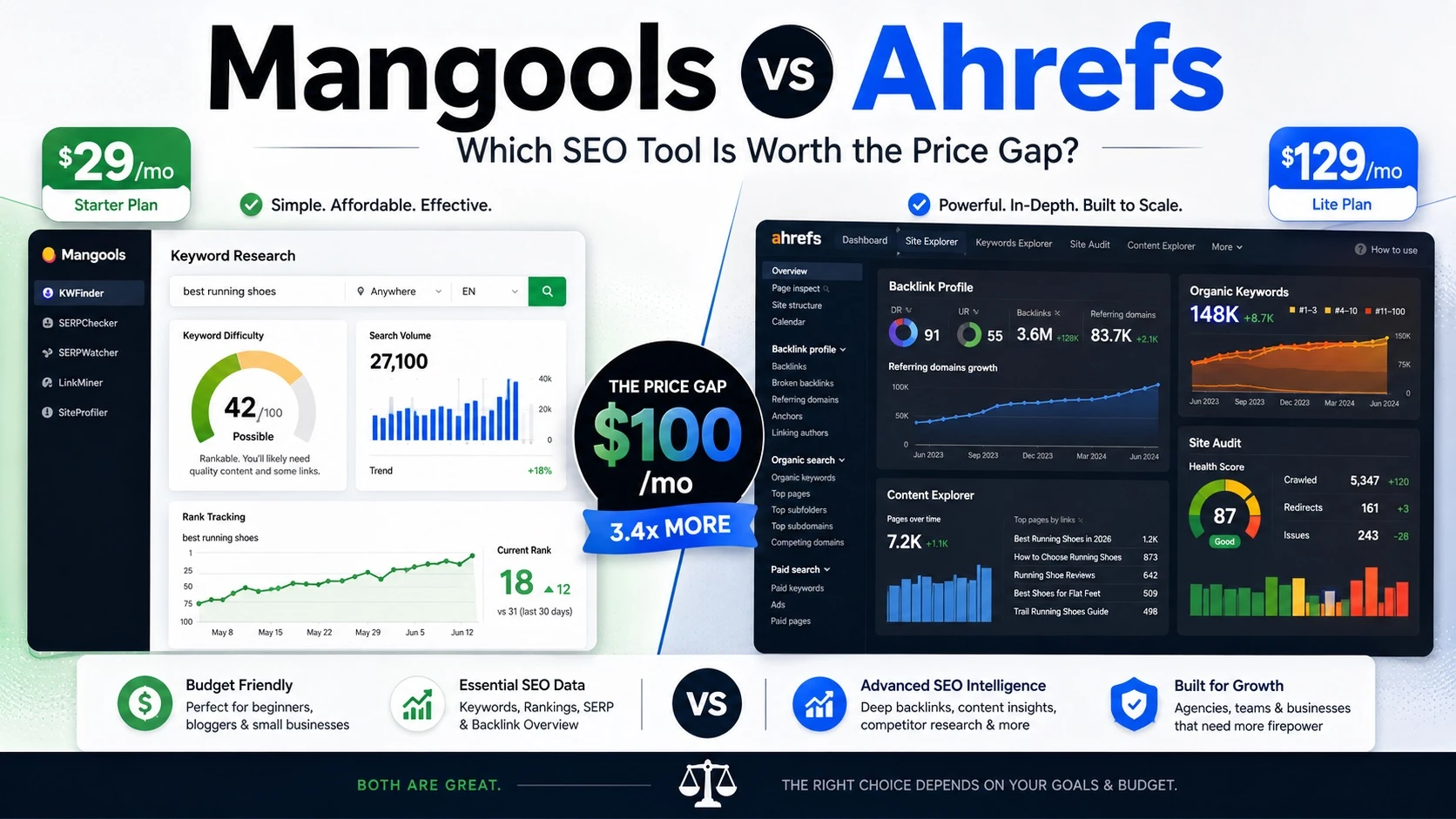
Price is often the deciding factor. Here is what each tool costs, based on the official Ahrefs pricing page and Mangools plan details as of October 2026.
| Plan | Monthly price | Who it suits | Key limits |
| Ahrefs Starter | $29 | Beginners testing Ahrefs data | Limited usage, monthly billing |
| Ahrefs Lite | $129 | Small businesses, personal projects | 5 projects, 750 tracked keywords, 1,000 credits per user |
| Ahrefs Standard | $249 | Freelance SEOs, consultants | 20 projects, 2,000 tracked keywords, unlimited credits |
| Ahrefs Advanced | $449 | In-house marketing teams | 50 projects, 5,000 tracked keywords |
| Ahrefs Enterprise | $1,499 | Large companies | Annual commitment required |
| Mangools Basic | About $49 | Bloggers, solo marketers | 100 keyword lookups per 24 hours, 1 seat |
| Mangools Premium | About $69 | Small teams | 500 keyword lookups per 24 hours, 3 seats |
| Mangools Agency | About $129 | Agencies | 1,200 keyword lookups per 24 hours, 5 seats |
A few things to know before you buy:
- Ahrefs saves you up to 17% on annual billing. Mangools saves up to 35% on annual plans.
- Ahrefs does not run discounts and generally does not give refunds.
- Mangools offers a full refund within 48 hours of payment.
- Every Mangools plan includes all five tools, so you never lose features by choosing a cheaper plan.
Free Options for Each Tool
Ahrefs has no free trial on paid plans. Instead, it offers Ahrefs Free, which gives limited Site Explorer and Site Audit access for websites you own and verify. It also has free tools like a keyword generator and keyword difficulty checker.
KWFinder lets you sign up for free and run 5 keyword lookups every 24 hours. That is enough to test the tool properly before paying.
Which One Gives Better Value?
If you only need keyword research, KWFinder gives far more value per dollar. Its Basic plan costs a fraction of Ahrefs Lite and covers most daily keyword work.
If you need backlinks, audits, competitor analysis and reporting in one place, Ahrefs is better value overall, because you would otherwise pay for several separate tools.
Ahrefs Keywords Explorer vs KWFinder: Keyword Research Step by Step
Features on paper are one thing. Here is how keyword research actually feels in each tool.
How to Conduct Keyword Research in Ahrefs
- Open Keywords Explorer and enter one or more seed keywords, or use AI to suggest seeds from a topic.
- Choose your target country.
- Check the overview: search volume, KD, Traffic Potential and Parent Topic.
- Open the Matching terms and Related terms reports to find hundreds of ideas.
- Filter by low KD and decent volume, then use the Questions filter for FAQ ideas.
- Use Clusters by Parent Topic to group keywords so one page can rank for many terms.
- Review the SERP overview to see who ranks and how many backlinks they have.
- Save the best keywords to a list and map them to pages.
How to Do Keyword Research in KWFinder
- Type your seed keyword, or a competitor’s domain, into the search box.
- Pick a location, even a single city, and a language.
- Browse the related keywords list with volume, difficulty and trend charts.
- Use the Questions and Autocomplete tabs for long-tail ideas.
- Click any keyword to see its difficulty score and the top-ranking pages beside it.
- Save keywords to a list for your content plan.
The difference is clear. Ahrefs gives more steps, more data and smarter grouping. KWFinder gets you to a usable keyword list faster with less effort.
Whichever tool you choose, keywords are only half the job. The page itself must answer the searcher fully, follow Google’s people-first content guidelines, and get the basics of on-page SEO right, from titles to headings to internal links.
Pros and Cons: An Honest KWFinder Review and Ahrefs Review
Ahrefs
What We Like
- One of the biggest keyword and backlink databases available
- Traffic Potential and Parent Topic save time when planning content
- Covers almost every SEO task in one login
- Strong AI visibility tracking for modern search
What Could Be Better
- Expensive for beginners and small sites
- No free trial and generally no refunds
- Lite plan has usage credits that can run out
KWFinder
What We Like
- Very easy to learn, even for complete beginners
- Great for local and long-tail keywords
- Affordable, with all five Mangools tools in every plan
- Free daily lookups and a 48-hour money-back guarantee
What Could Be Better
- Smaller keyword database than Ahrefs
- Daily lookup limits on lower plans
- Backlink and site analysis tools are basic
Best Ahrefs Alternatives Worth Trying
If Ahrefs feels too costly or complex, you are not alone. These are the best Ahrefs alternatives for different needs:
- KWFinder (Mangools): the best Ahrefs alternative for keyword research on a budget. You can try KWFinder free before paying.
- Semrush: a full SEO and marketing suite, strong for PPC and content marketing.
- Moz Pro: known for its Domain Authority metric and a clean keyword tool.
- SE Ranking: a mid-priced all-in-one tool popular with small agencies.
- Ubersuggest: a low-cost option for beginners.
- Google Keyword Planner: free volume ranges straight from Google Ads data.
Among these, KWFinder is the most common pick for people who mainly want keyword research without paying for a full suite.
Ahrefs or KWFinder: Which One Should You Choose?
Choose Ahrefs If You
- Run an agency or manage many client websites
- Need backlink analysis, site audits and rank tracking together
- Work in competitive niches where deeper data matters
- Want to track your brand inside AI answers at scale
Choose KWFinder If You
- Are a blogger, freelancer or small business owner
- Mainly need to find low-competition keywords
- Target local customers in a specific city
- Want a simple tool at a much lower price
Many SEOs actually use both: KWFinder for fast daily keyword ideas and Ahrefs for deep competitor and backlink research when a project needs it.
Bottom Line
The Ahrefs vs KWFinder debate does not have one winner for everyone. Ahrefs is the powerhouse: bigger data, more tools and deeper insights, at a higher price. KWFinder is the smart budget choice: simple, fast and focused on finding keywords you can actually rank for. If you are starting out or running a small site, begin with KWFinder’s free lookups and upgrade only when you need more. If SEO is your full-time job or you manage clients, Ahrefs will pay for itself.
Whatever tool you pick, remember that rankings come from helpful content, not just the right keyword. Search keeps changing, so stay updated on events like the latest spam update and keep your content honest and useful. For more simple, practical guides on SEO, AEO and AI search, keep exploring Digimastreys. We test the tools so you can focus on growing your traffic.
Frequently Asked Questions
Ahrefs vs KWFinder: which is better for keyword research?
It depends on your needs. Ahrefs is better if you want the largest keyword database plus backlinks, audits and rank tracking. KWFinder is better if you want simple, affordable keyword research, especially for long-tail and local keywords.
What are the best Ahrefs alternatives in 2026?
The best Ahrefs alternatives are KWFinder (Mangools), Semrush, Moz Pro, SE Ranking, Ubersuggest and Google Keyword Planner. For pure keyword research on a budget, KWFinder is usually the best Ahrefs alternative.
KWFinder review: is KWFinder worth it?
Yes, for most bloggers, freelancers and small businesses. It is easy to use, gives reliable difficulty scores and includes four extra SEO tools in every plan. Heavy users may find the daily lookup limits tight on the Basic plan.
What is the difference between Ahrefs KW Explorer and KWFinder?
Ahrefs Keywords Explorer has a much bigger database, plus metrics like Traffic Potential, Parent Topic and keyword clustering. KWFinder is simpler, cheaper and stronger for city-level local keyword research.
How to conduct keyword research in Ahrefs?
Open Keywords Explorer, enter seed keywords and pick a country. Then check Matching terms and Related terms, filter by low KD and good volume, group ideas by Parent Topic and save the best ones to a list.
How to use Ahrefs for free?
Sign up for Ahrefs Free and verify your website to get limited Site Explorer and Site Audit data. You can also use Ahrefs’ free tools, such as the keyword generator and keyword difficulty checker. There is no free trial on paid plans.
Is Ahrefs more accurate than Moz?
No SEO tool is 100% accurate, because all of them estimate search volume and traffic. Ahrefs is often preferred for its larger keyword index and frequently updated backlink data, but the best check is to compare any tool’s numbers with your own Google Search Console data.
Why is keyword research important for SEO?
Keyword research shows what your audience actually searches for. It helps you pick topics you can rank for, match search intent and avoid wasting time on keywords that are too competitive or have no traffic.

Vikas Verma is an SEO specialist and web designer focused on SEO strategy, website design, and digital experiences.