









Comparing HubSpot and Marketo often feels overwhelming. Ask five different marketers or read six different reviews, and you will hear completely conflicting advice. One side calls HubSpot the obvious all-in-one choice, while the other insists Marketo is the only platform built for true enterprise scale.
Both platforms launched back in 2006, but today they serve fundamentally different types of marketing teams.
Choosing between them requires cutting through vendor claims to understand real operational trade-offs.
In this comprehensive HubSpot vs Marketo comparison, we break down core features, real pricing structures, AI capabilities, CRM integrations, specific team requirements, top market alternatives, and a practical framework to make the right choice.
Quick Answer: HubSpot or Marketo?
Choosing between HubSpot and Adobe Marketo Engage depends on your team’s size, tech stack, budget, and campaign complexity.
HubSpot suits small to mid-size and growing teams looking for an all-in-one platform with a built-in CRM, intuitive visual workflows, fast onboarding, and transparent published pricing.
Marketo fits large B2B enterprises managing complex, multi-touch campaigns. It relies on a dedicated marketing operations team and integrates deeply with external CRMs like Salesforce or Microsoft Dynamics.
Keypoints:
- Built-in CRM: HubSpot includes a free native CRM, whereas Marketo requires an external CRM.
- Ease of Use: HubSpot features visual drag-and-drop workflows, while Marketo has a steep learning curve.
- Automation Depth: Marketo handles multi-score logic, whereas HubSpot excels at linear visual journeys.
- Pricing Transparency: HubSpot publishes clear tiers online, while Marketo operates on custom quote-based pricing.
- AI Approach: HubSpot Breeze handles daily tasks, whereas Adobe Sensei focuses on predictive audience modeling.
- Best-Fit Teams: HubSpot fits growing mid-market businesses, while Marketo serves large Salesforce-centric enterprise operations.
- Hidden Cost Warning: HubSpot charges for marketing contact overages, while Marketo demands add-ons for attribution.
What Is HubSpot Marketing Hub?
HubSpot Marketing Hub is an all-in-one marketing automation software designed to capture leads, run campaigns, nurture prospects, and track revenue.
Launched in 2006 as an inbound marketing tool, it has expanded into a full customer platform.
It runs on HubSpot’s built-in Smart CRM, ensuring sales and marketing work from identical contact data.
The platform seamlessly connects with Sales Hub, Service Hub, Content Hub, and Data Hub to manage the entire buyer journey.
It also incorporates native Breeze AI features for automated drafting, prospecting, and lead qualification.
Best for: Small-to-midsize businesses and growing enterprises wanting an easy-to-manage, unified marketing and CRM ecosystem.
What Is Adobe Marketo Engage?
Adobe Marketo Engage is an enterprise-grade B2B marketing automation platform designed to manage complex campaigns, multi-touch lead nurturing, and large prospect databases.
Founded in 2006, Marketo was acquired by Adobe in 2018 for approximately $4.75 billion and integrated into the Adobe Experience Cloud ecosystem.
Unlike all-in-one tools, it has no built-in CRM, relying instead on native synchronization with external enterprise CRMs like Salesforce and Microsoft Dynamics 365.
The platform leverages Adobe Sensei AI to deliver predictive audience segmentation, dynamic content, and advanced lead scoring.
Best for: Large enterprise B2B companies with complex campaign structures, dedicated marketing operations teams, and established external CRM ecosystems.
HubSpot vs Marketo at a Glance
| Feature / Metric | HubSpot Marketing Hub | Adobe Marketo Engage |
| Best for | SMBs, mid-market, and scale-ups wanting unified CRM and marketing | Large B2B enterprises managing complex multi-touch campaigns |
| Built-in CRM | Free native Smart CRM included across all plans | No native CRM; requires Salesforce or MS Dynamics sync |
| Ease of use | Intuitive visual workspace; rated 8.6/10 on G2 | Steep learning curve; rated 7.3/10 on G2 |
| Automation depth | Visual branching workflows for linear journeys | Deep condition-based Smart Campaigns and parallel lead scoring |
| AI tools | Embedded Breeze AI (content, copilot, prospecting agents) | Adobe Sensei (predictive content/audiences) & Firefly |
| Reporting | Out-of-the-box dashboards & multi-touch revenue attribution | Advanced journey analytics; attribution requires Marketo Measure |
| Pricing model | Published tiered pricing based on seats and contacts | Custom quote-based pricing based on database size |
| Starting cost | Paid plans start at 15–20/seat/month; Pro at $890/month | Quote-only; third-party estimates range 895–3,200+/month |
| Team needed | Lean marketing teams; accessible without dedicated IT admin | Dedicated Marketo administrators or MOps specialists required |
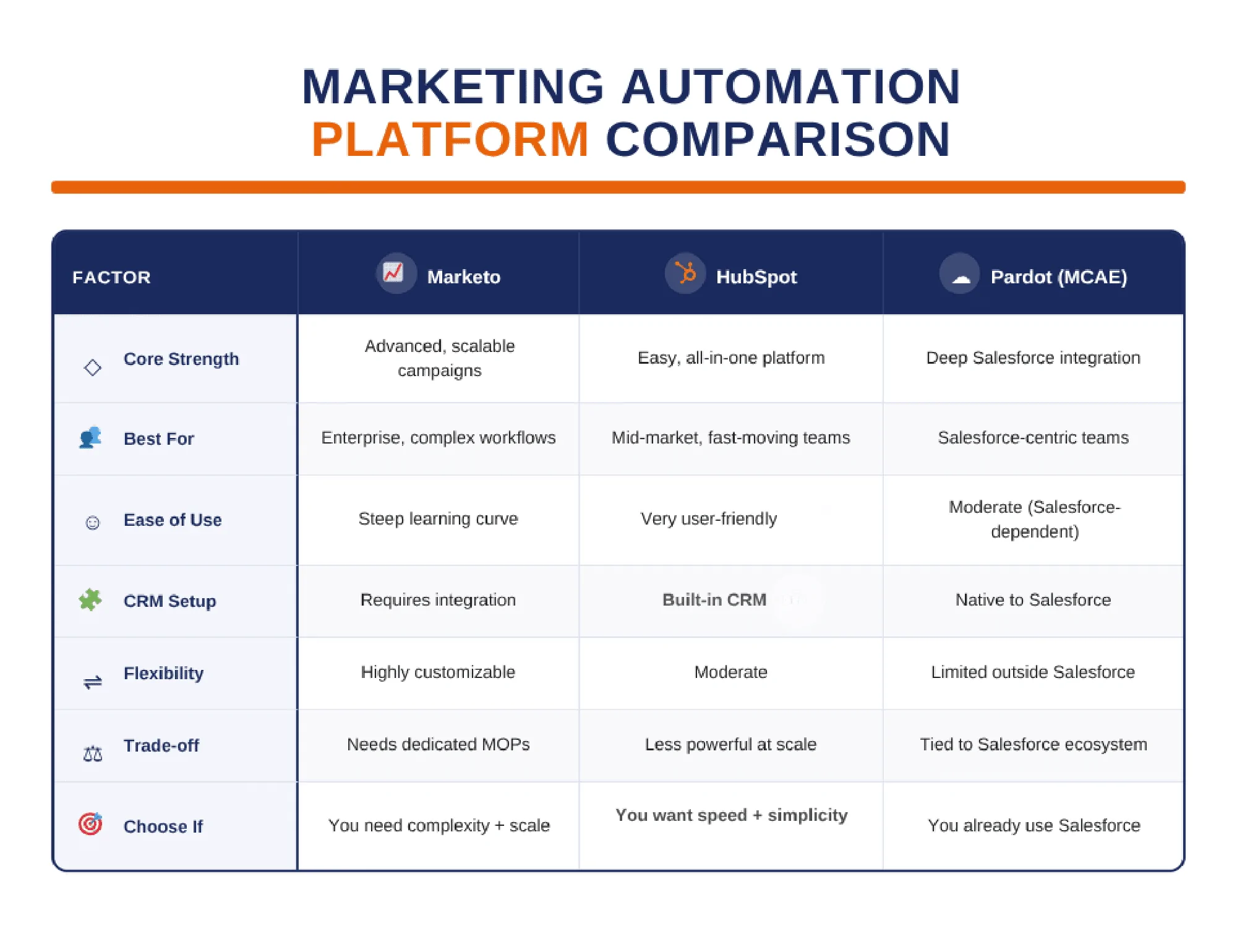
HubSpot vs Marketo: Feature-by-Feature Comparison
Ease of Use and Learning Curve
HubSpot is significantly easier to learn and use day to day, allowing generalist marketers to launch visual campaigns without technical assistance. Marketo features a steeper learning curve, requiring dedicated administrative expertise to manage its modular folder structures and complex automation logic.
HubSpot uses intuitive visual canvas builders for emails, forms, and workflows. New users can sign up and start launching campaigns in days. Marketo organizes capabilities into separate operational modules (Marketing Activities, Design Studio, Database, Analytics). Getting campaign execution right in Marketo often requires specialized training or formal Marketo University certification. User feedback on G2 highlights this usability gap, rating HubSpot 8.6/10 for ease of use compared to Marketo’s 7.3/10.
- Choose HubSpot if: You want your marketing team to execute campaigns independently without relying on a dedicated marketing operations admin.
- Choose Marketo if: You have dedicated marketing operations specialists trained to build, govern, and maintain complex multi-tier program architectures.
Marketing Automation and Lead Nurturing
HubSpot handles automation through an intuitive visual canvas, whereas Marketo uses condition-driven Smart Campaigns and multi-stream engagement programs. While both platforms support lead nurturing and behavioral triggers, they differ significantly in structural complexity and technical execution.
HubSpot uses drag-and-drop visual workflows that let teams map out linear journeys and branching logic based on form fills, page visits, or email activity. Full workflow automation is available starting from the Professional tier. While HubSpot historically focused on simpler drips, it has closed the gap since 2021 by adding custom objects and coded workflow actions.
Marketo’s Smart Campaigns offer deeper granular control. Marketers can set complex rules using detailed web behavior, product usage, and historical purchase data.
| Campaign Type | HubSpot | Marketo |
| Simple drip nurtures | Best fit (fast visual setup) | Works, but high setup overhead |
| Branching lead journeys | Best fit (easy drag-and-drop logic) | Effective, requires non-visual rules |
| Complex multi-touch B2B | Capable (requires Pro/Enterprise) | Best fit (handles complex nested logic) |
CRM Integration (Built-In CRM vs Salesforce Sync)
HubSpot comes with a free native Smart CRM built into every plan, whereas Adobe Marketo Engage has no proprietary CRM and must sync with external platforms.
Marketo provides native, bi-directional syncs for Salesforce and Microsoft Dynamics 365, designed to mirror campaigns and lead activities directly into enterprise sales tools. However, configuring this decoupled architecture requires meticulous field mapping, sync rules, and ongoing database administration.
HubSpot also offers a robust, native Salesforce integration for teams that prefer to keep Salesforce as their main CRM while leveraging Marketing Hub’s visual suite.
Operating a two-system setup (like Marketo plus an external CRM) creates specific operational friction points:
- Data Synchronization Delays: Sync latency between marketing automation and CRM databases can cause sales reps to reach out before the recent activity updates process.
- Field Mapping & Duplication Errors: Conflicting field definitions across platforms frequently lead to overwritten property values or duplicate records.
- Ownership & Reporting Blind Spots: Determining whether the marketing engine or the CRM owns specific lifecycle updates introduces attribution discrepancies.
Email, Personalization and Landing Pages
HubSpot simplifies content creation through drag-and-drop email builders, personalization tokens, and no-code smart rules. Marketo provides deeper, programmatic personalization using segmented dynamic content, eight distinct token types, and Apache Velocity scripting, which often requires developer expertise.
HubSpot includes native landing page and form tools within its marketing hub, expanding into complete website management when paired with Content Hub.
Marketo features dedicated landing page and form builders, but enterprise teams typically pair it with an external content management system (CMS) like Adobe Experience Manager or WordPress.
- Choose HubSpot if: Your team wants to build, test, and publish emails and landing pages quickly without writing custom code.
- Choose Marketo if: You need highly customized, script-driven email content and complex dynamic asset templates across global program folders.
Lead Scoring and Account-Based Marketing
Marketo provides deeper, highly granular lead scoring and account-based marketing (ABM) capabilities, supporting multiple parallel scoring models and complex buying committee tracking. HubSpot offers approachable scoring and ABM tools on qualifying tiers, making sales and marketing alignment straightforward.
Marketo excels at managing multi-dimensional scoring frameworks simultaneously, tracking behavioral, demographic, and product engagement scores across accounts. Advanced ABM features and segmentation rules often sit further up its enterprise pricing tiers.
HubSpot integrates scoring and target account management directly into its CRM, allowing sales reps to see buying group activity immediately. HubSpot also offers predictive lead scoring on the Enterprise tier.
Always check each vendor’s current tier-specific feature list, as advanced ABM and predictive scoring rules vary by plan.
AI Features (Breeze vs Adobe Sensei)
Both platforms integrate powerful artificial intelligence tools, but they approach AI from very different perspectives. HubSpot’s Breeze is embedded directly across the CRM and marketing workspace, featuring built-in content writers, virtual agents, a marketing copilot, and predictive lead scoring on Enterprise plans. Adobe Marketo Engage relies on Adobe Sensei for predictive content and audience modeling, alongside Adobe Firefly integration for image generation and Dynamic Chat features.
HubSpot embeds AI into daily marketing workflows so generalist teams can quickly generate copy, summarize engagement, or automate prospecting tasks without switching tools.
Adobe leverages its broader ecosystem, offering advanced predictive insights and cross-channel personalization. However, some advanced AI capabilities or specialized components like the Adobe Marketo Optimizer may require separate Adobe product licenses.
Clean data remains essential; any AI tool only produces accurate output when underlying contact and CRM records are well-maintained.
Reporting and Revenue Attribution
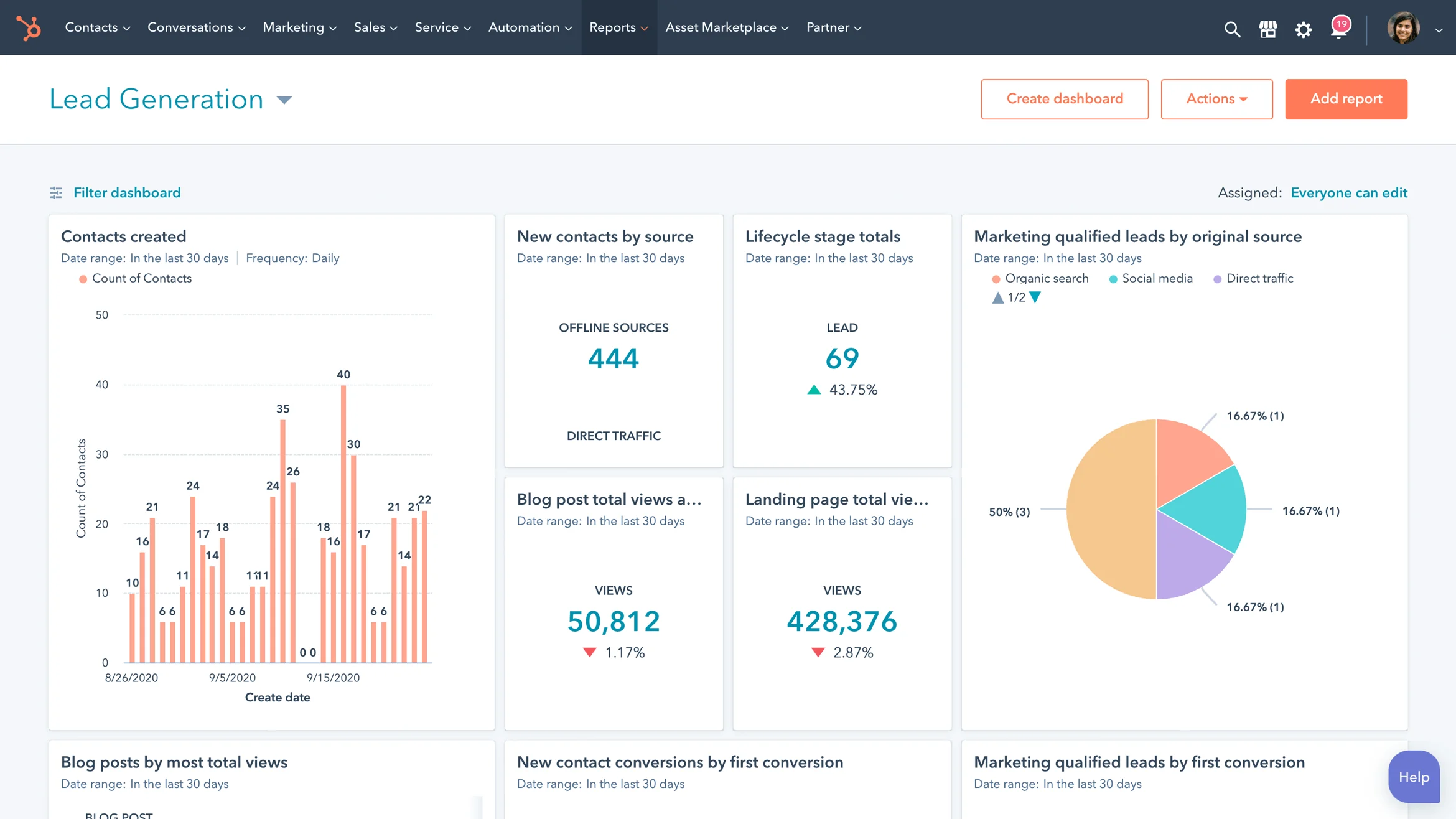
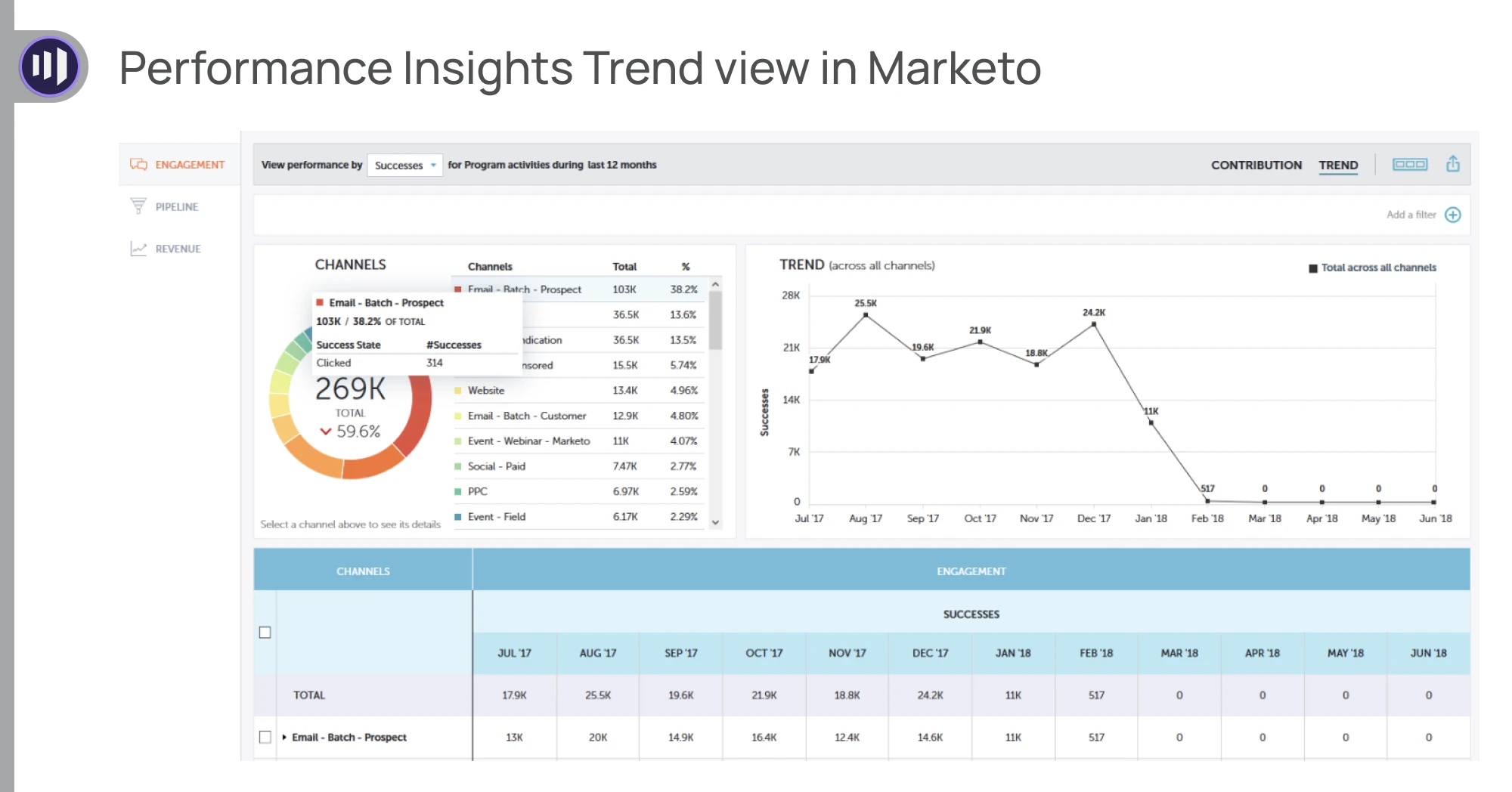
HubSpot provides out-of-the-box reporting and multi-touch revenue attribution powered by its unified CRM data. Marketo offers deep analytics customization, but advanced attribution and multi-channel insights often require add-on solutions like Marketo Measure (formerly Bizible) or Adobe Analytics.
HubSpot dashboards give marketing and sales teams immediate visibility into pipeline velocity, campaign ROI, and deal attribution without requiring external data connectors. Enterprise plans unlock deeper multi-touch attribution models.
Marketo excels at granular journey analytics and operational reports. However, tracking first-touch-to-revenue across complex enterprise ecosystems typically demands additional licensing for Marketo Measure or integration with Adobe Experience Cloud reporting tools.
HubSpot vs Marketo Pricing in 2026
HubSpot Marketing Hub Pricing
HubSpot Marketing Hub starts with free tools, with paid plans beginning at approximately $20 per seat/month for Starter. However, costs scale significantly when moving into advanced automation tiers.
www.resonatehq.com+ 1
| Plan | Starting Price (Monthly) | Included Seats | Included Contacts | Onboarding Fee |
| Starter | ~$20 / seat | Variable | 1,000 | None |
| Professional | ~$890 / month | 3 seats | 2,000 | ~$3,000 |
| Enterprise | ~$3,600 / month | 5 seats | 10,000 | ~$7,000 |
Note: Pricing data verified from HubSpot’s official pricing page.
HubSpot operates on a contact-based billing model, meaning you pay according to the total number of marketing contacts stored in your database. If your active contact volume exceeds your tier limit mid-contract, HubSpot automatically bumps you up to the next contact tier, increasing your recurring bill until renewal.
Marketo Engage Pricing
Adobe does not publish official prices; contracts require custom quotes determined by database size, contact volume, and feature packages.
Adobe organizes Marketo Engage into four main tiers: Growth, Select, Prime, and Ultimate. Third-party benchmark data estimates entry pricing starting around $1,000 to $2,000+ per month for smaller databases, scaling rapidly past $3,000 to $6,000+ per month for mid-market and enterprise packages.
Note: Older marketing articles referencing “Spark,” “Standard,” “Select,” or “Enterprise” naming conventions are outdated; current Adobe documentation uses Growth, Select, Prime, and Ultimate.
Review package details and schedule consultations directly on Adobe’s Marketo Engage page.
Hidden Costs and Total Cost of Ownership
The initial software sticker price rarely reflects the true total cost of ownership (TCO) for either platform. Both systems carry significant financial and operational obligations beyond base licensing fees.
| Cost Area | HubSpot | Marketo |
| Licensing | Tiered subscription per seat | Custom quote-based agreement |
| Contact Growth | Automatic bumps for contact overages | Database tier expansions (blocks of 10k+) |
| Onboarding | Mandatory professional services fee (Pro/Ent) | Custom implementation service fees |
| Add-Ons | Advanced data, custom objects, IP tracking | Marketo Measure, Sales Insight, additional APIs |
| Admin Staffing | Lean team; managed by marketing generalists | Dedicated MOps specialists or external consultants |
| Training | Free HubSpot Academy & community resources | Paid Marketo University and professional certifications |
| CRM Infrastructure | Built-in Smart CRM (no extra cost) | Requires external CRM (Salesforce/Dynamics licenses) |
Four critical questions to ask Adobe before signing a Marketo contract:
- Exactly how is database size and contact volume calculated and audited during contract renewals?
- Which advanced analytics and multi-touch attribution features are included natively versus requiring add-on packages?
- What are the strict limits on API call volumes, webhooks, and concurrent custom object records?
- What is the maximum allowable percentage increase for software renewal pricing at the end of the initial contract term?
How Much Team Effort Does Each Platform Need?
HubSpot allows lean marketing teams to launch and manage campaigns independently, whereas Marketo typically requires a dedicated marketing operations (MOps) specialist or external technical consultant.
Setting up HubSpot takes days rather than weeks, with ongoing maintenance handled easily by marketing generalists. In contrast, Marketo requires specialized administration to build Smart Campaigns, monitor CRM synchronization rules, and maintain rigorous data hygiene. Training teams on Marketo’s modular architecture also demands formal courses or certifications.
No matter which platform you choose, your automation engine requires consistent input; building a robust B2B content marketing strategy is essential to feed these systems with high-converting assets.
- If you have no marketing ops person: HubSpot is the practical choice for self-sufficiency.
- If you have one dedicated MOps specialist: Marketo unlocks its full, granular automation potential.
- If you have a blended growth team: HubSpot keeps sales and marketing aligned effortlessly within one CRM.
Best Marketo Alternatives (If Neither Feels Right)
If neither HubSpot nor Marketo fits your exact workflow, enterprise and mid-market organizations can choose from several capable alternatives, including Salesforce Account Engagement (Pardot), Oracle Eloqua, and ActiveCampaign.
Salesforce Account Engagement (Pardot)
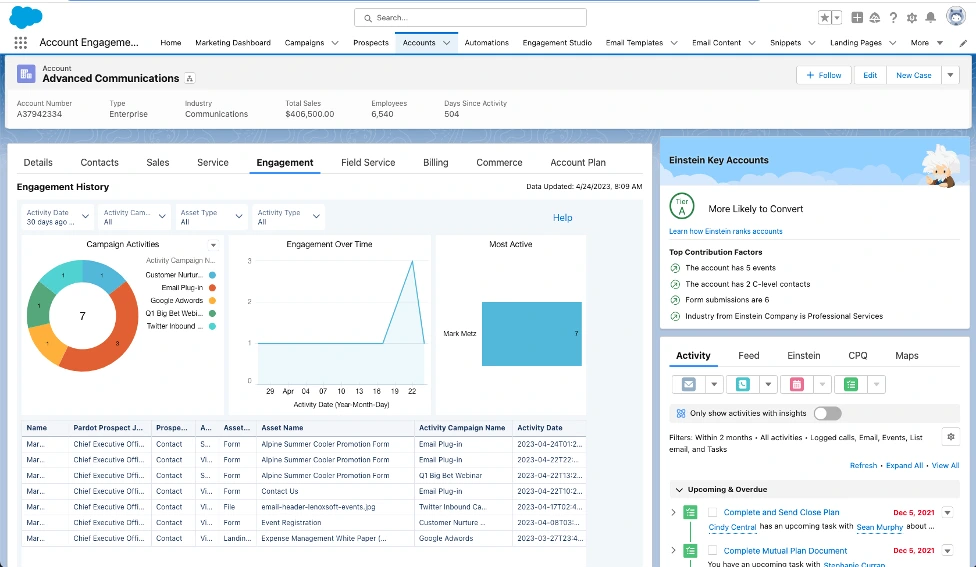
- Best for: Enterprise B2B teams heavily invested in the Salesforce ecosystem.
- Main strength: Deep, seamless native integration with Salesforce CRM objects, scoring, and sales workflows.
- Main limit: Can feel rigid and expensive for non-Salesforce users.
Oracle Eloqua
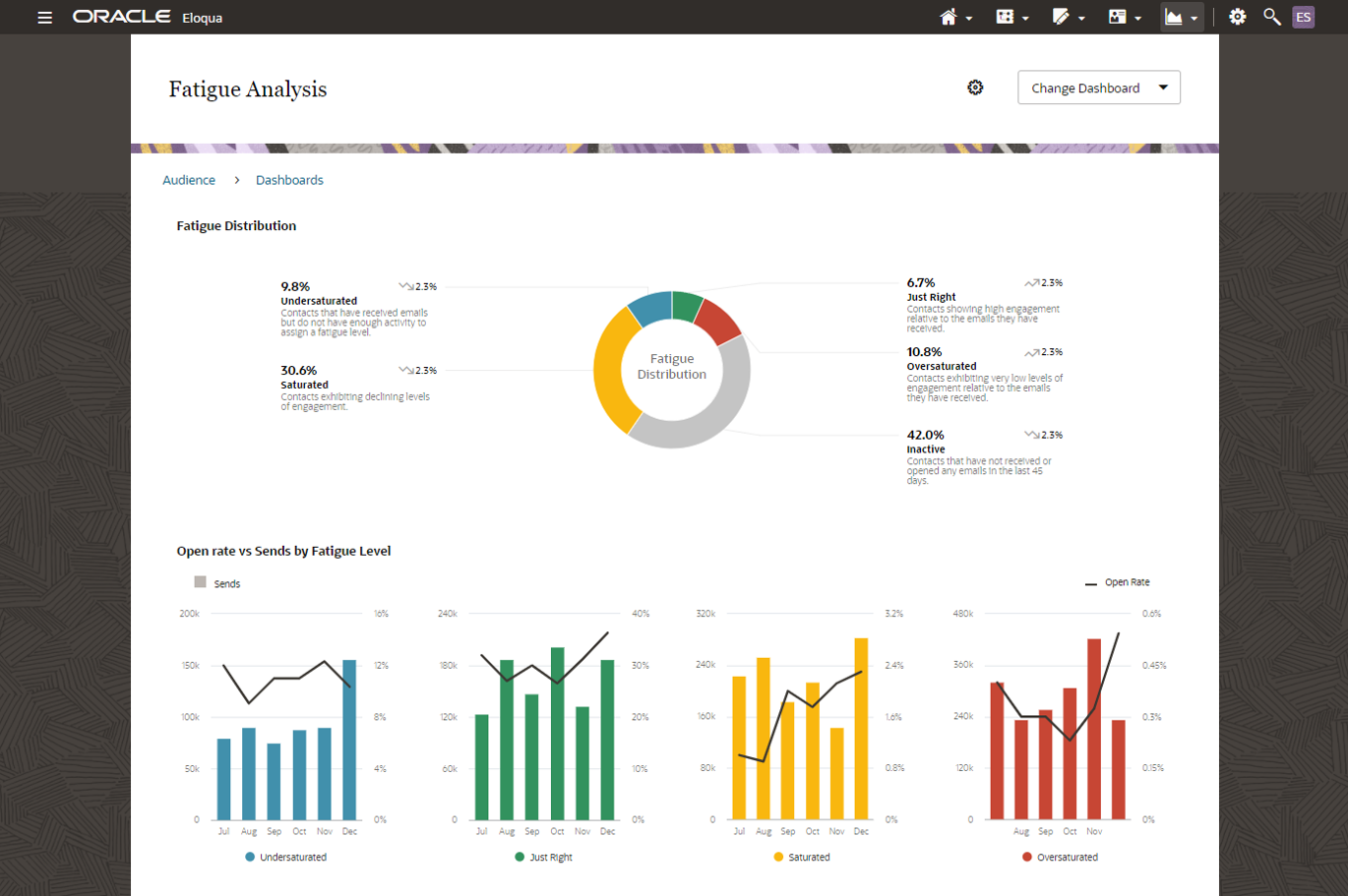
- Best for: Large, complex global enterprises with sophisticated, multi-channel campaigns.
- Main strength: Massive data-handling capacity and highly customizable, enterprise-grade campaign design architecture.
- Main limit: Steep learning curve requiring dedicated technical operations staff.
ActiveCampaign
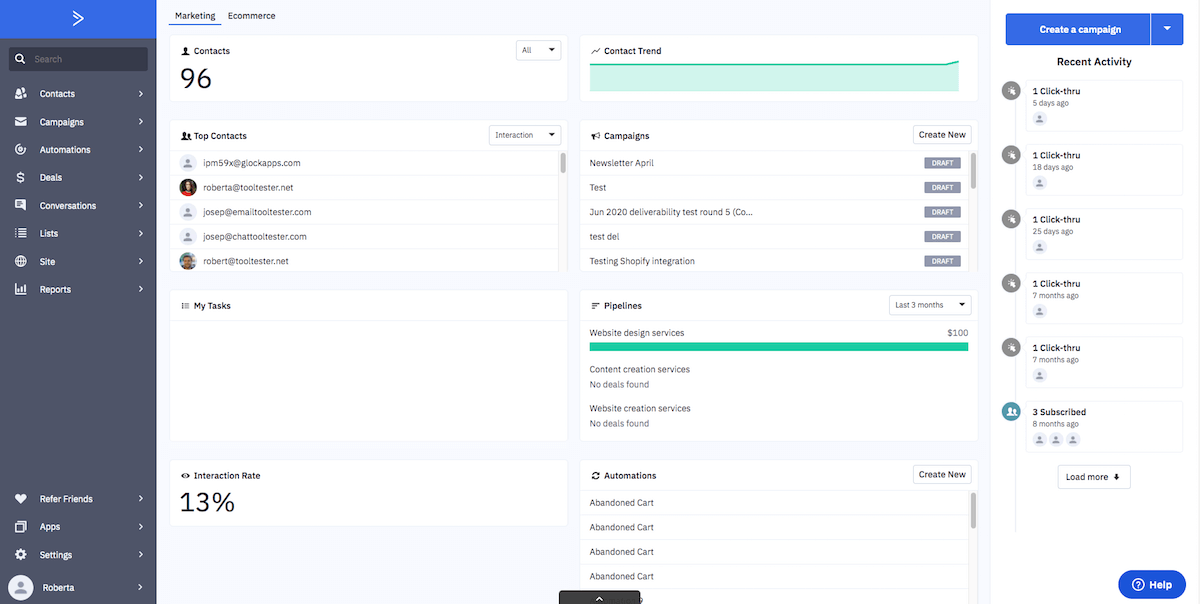
- Best for: Small-to-midsize businesses seeking advanced automation on a budget.
- Main strength: Intuitive automation builders combined with built-in CRM and e-commerce integrations.
- Main limit: May lack deep enterprise-tier multi-touch reporting and global governance controls.
| Tool | Best for | CRM fit | Pricing style |
| Salesforce Account Engagement | Salesforce-centric enterprises | Native Salesforce sync | Tiered, user/database-based [VERIFY] |
| Oracle Eloqua | Global enterprise B2B | Flexible external CRM sync | Custom quote-based [VERIFY] |
| ActiveCampaign | SMBs & mid-market growth | Built-in CRM / multi-CRM sync | Scaled tiered subscription [VERIFY] |
If you only need simple workflow automation, tools in our comparison of automation tools may be enough to handle your day-to-day triggers without a heavyweight enterprise platform.
HubSpot or Marketo? Pick Based on Your Situation (query fan-out)
Not sure? Find your situation below.
“I’m a Small Business or Startup with 1–3 Marketers”
HubSpot is the ideal fit for lean teams needing rapid onboarding without a dedicated operations hire. HubSpot offers transparent, published pricing and free tools to start, making day-to-day campaign execution straightforward. Marketo’s complex architecture and custom enterprise pricing are likely heavy overkill for a startup, though you should still monitor HubSpot’s contact-tier volume limits as your database grows.
“We Already Use Salesforce”
If your enterprise relies heavily on Salesforce and employs dedicated operations staff, Marketo syncs deeply with Salesforce objects and complex enterprise sales rules. However, HubSpot also features a robust native Salesforce integration. If your team wants sales alignment without managing a decoupled two-system setup, lean teams can keep Salesforce and use HubSpot for marketing. Rule of thumb: choose Marketo for heavy CRM customization, HubSpot for speed.
“We Have a Big Database and Complex Campaigns”
Marketo fits better for very large databases, multi-dimensional scoring models, and complex account-based marketing (ABM) across multiple buying groups and regional partitions. While Marketo handles massive data volume exceptionally well, you must trade off that capability against higher administrative overhead, required developer support, and quote-based enterprise pricing.
“We Want Marketing and Sales on One Platform”
HubSpot wins decisively here due to its unified Smart CRM architecture. Because both sales and marketing operate on the same shared database, teams avoid data sync delays, duplicate records, and fragmented reporting layers, giving everyone full pipeline visibility instantly.
“We’re Already in the Adobe Ecosystem”
Marketo fits smoothly if your enterprise already uses Adobe Experience Manager or Adobe Analytics. However, you should carefully verify which advanced AI features and multi-touch attribution tools require separate Adobe product licenses or add-on fees.
“We’re on a Tight Budget”
HubSpot is easier to budget thanks to published pricing tiers and predictable entry costs. Even so, you must budget for contact tier expansions and mandatory professional onboarding fees. Always request comprehensive total cost of ownership (TCO) quotes from both vendors before signing.
Thinking of Switching from Marketo to HubSpot?
Switching from Marketo to HubSpot is a common migration path for organizations seeking easier daily usability and a unified CRM, but remember that you are rebuilding automation logic rather than simply moving contact records.
A structured migration requires careful sequencing to prevent data loss and campaign disruption:
- Audit current programs: Review active Marketo campaigns, forms, and landing pages to determine what to migrate versus what to archive.
- Map fields and lifecycle stages: Standardize custom field definitions, lead statuses, and CRM property mappings to match HubSpot’s architecture.
- Rebuild workflows: Translate condition-based Marketo Smart Campaigns into HubSpot’s visual branching canvas.
- Test scoring and reporting: Recreate lead scoring models and custom dashboards, running parallel verification checks before going live.
- Launch and monitor: Switch off legacy Marketo automations, route traffic to HubSpot forms, and closely monitor data synchronization.
Caution: Expect historical attribution and multi-touch reporting gaps during the transition period while new attribution data accumulates inside HubSpot.
5 Mistakes to Avoid When Choosing a Marketing Automation Platform
Avoiding costly implementation pitfalls requires evaluating platform scalability, internal team capabilities, and architectural alignment long before signing a contract.
- Choosing on feature lists alone: Buying based on unused capabilities while ignoring daily usability frustrates your marketing team.
- Ignoring database growth costs: Failing to model contact tier expansions causes unexpected spikes in your renewal pricing.
- Underestimating staffing requirements: Assuming marketing generalists can manage complex enterprise platforms without dedicated operations support leads to stalled campaigns.
- Skipping data cleanup: Migrating messy contact lists and duplicate records directly into a new system guarantees immediate synchronization errors.
- Not testing CRM sync beforehand: Failing to validate bi-directional data flow and field mapping during a trial risks severe sales pipeline blind spots.
Final Verdict: HubSpot or Marketon?
Choosing between HubSpot and Marketo comes down to matching your technical resources, database scale, and team workflow preferences against platform complexity.
- Choose HubSpot if: You want unified sales and marketing, faster onboarding, and intuitive visual workflows managed by a lean team.
- Choose Marketo if: You run complex global enterprise campaigns requiring deep custom logic, Apache Velocity scripts, and advanced multi-channel tracking.
- Consider alternatives if: Your organization needs a Salesforce-native tool like Pardot or a specialized SMB marketing automation suite.
At Digimastreys, we help brands create content that ranks in Google, AI Overviews and AI search, whichever platform they pick. To support your technical research, review our generative engine optimization guide for optimizing visibility across AI models, and keep our Ahrefs vs Semrush breakdown handy for competitive keyword tracking.
Frequently Asked Questions
Is HubSpot better than Marketo?
HubSpot is generally better for growing mid-market teams that prioritize ease of use, native CRM integration, and fast onboarding. Marketo is better for complex enterprise organizations requiring deep custom logic, Apache Velocity scripting, and multi-channel global campaigns. Choose based on your team’s technical resources and operational scale.
Is Marketo a CRM?
No, Marketo is a standalone marketing automation platform that does not include a proprietary CRM. It must be integrated with an external database or CRM system, most commonly Salesforce or Microsoft Dynamic, to store core customer records, manage sales pipelines, and track full-funnel deal attribution data.
How much does Marketo cost per month?
Marketo does not publish official pricing; costs vary by package and database size. Third-party benchmarks estimate entry packages start around $1,000 to $2,000+ monthly, scaling past $3,000 to $6,000+ for enterprise tiers. Contact Adobe directly for custom quotes matching your contact volume and feature needs.
Is HubSpot cheaper than Marketo?
HubSpot generally offers lower entry costs and more predictable tiered pricing starting around $20/seat for Starter, with Professional and Enterprise plans scaling by contact volume. Marketo’s custom-quote model often results in higher total cost of ownership when factoring in mandatory database tiers and external CRM expenses.
Can I use HubSpot with Salesforce?
Yes, HubSpot features a robust, native bi-directional Salesforce integration. This allows sales teams to continue using Salesforce as their primary CRM while marketing teams leverage HubSpot’s visual campaign builders, tracking synchronization rules, and unified asset management directly across both platforms seamlessly.
Is Marketo hard to learn?
Yes, Marketo has a steep learning curve and requires dedicated marketing operations expertise. Because it relies heavily on custom triggers, Smart Campaigns, segmentation rules, and optional coding, mastering the platform usually demands formal certification, technical training, and ongoing administrative specialization.
What is the best alternative to Marketo?
The best alternative depends on your tech stack; Salesforce Account Engagement (Pardot) is ideal for Salesforce-centric enterprises, Oracle Eloqua suits complex global brands, and HubSpot fits teams seeking unified usability. ActiveCampaign serves mid-market budgets. Pricing varies by package and database size; check official pages.

SNEHA PRAMAL
Sneha Pramal is a content writer focused on creating clear, engaging, and useful digital content.
Sneha Pramal is a content writer focused on creating clear, engaging, and useful digital content.